


The moment your heart sinks
You reach for it and it's not there.
The bag in the auto. The keys at the restaurant. The wallet at security. You pat your pocket and feel nothing.
Most times it's not stolen. Someone honest has it, but they have no way to reach you.


How it works
A tag that brings your things home
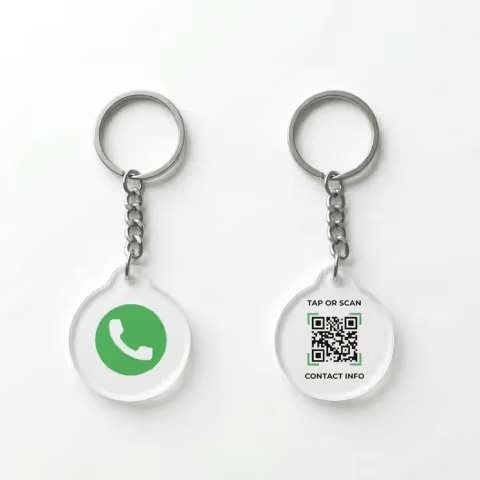
Attach the lessworry tag to your keys, bag, wallet, or luggage. When someone finds it, they tap the NFC chip or scan the QR code.
Instantly: your number, a call button, a WhatsApp link. No app needed on either side.
What the tag shares
Everything a finder needs to return your stuff
When someone taps or scans your tag, they see exactly how to reach you.
Your Phone Number
One-tap call button so the finder reaches you directly.
WhatsApp Quick Message
A pre-filled “I found your item” message, sent in one tap.
WhatsApp Location
The finder's location is shared so you know exactly where your item is.
Custom Message
Add a personal thank-you or reward note to make the finder feel appreciated.
“The auto driver wanted to return the bag.
He just didn't know how.
Now he does. One scan, one call.”
— One scan, one call
DIY Setup
Set it up once, done
No app or registration. Three steps on your phone.
Tap or Scan
Tap the tag or scan the QR code. A setup form opens in your browser.
Add Your Contact
Enter your phone number and a short message for the finder.
Attach & Forget
Clip it to your keys, bag, or wallet. If you leave something behind, the tag takes over.
Tags come blank. Set up when it arrives, update anytime.

When it helps
When this comes in handy
Common situations where the tag gets your stuff back.
Left in a Cab or Auto
Your bag rides away in the cab. The driver scans the tag and calls you.
Forgotten at a Restaurant
The waiter finds your keys or wallet after you leave — one tap and your phone rings.
Dropped at the Airport
Security rush, boarding chaos. If your bag is found, the tag connects you instantly.
Misplaced at Office
A colleague scans the tag and you're reunited before lunch.
Lost at the Gym
Your stuff moves around as much as you do. The tag stays put.
Public Transport
A fellow commuter scans the tag and calls you before the next stop.
Why everyday carry is different
The things you carry every day get left behind in different places
Keys, wallets, laptop bags, and camera pouches are usually found nearby: at work, in cafés, inside cabs, or at the gym. Recovery depends on fast recognition and even faster contact.
Keys and bike keys
These are often noticed only after you reach the next stop. A visible tag helps the person holding the keys call you before they get handed to a guard or desk.
Laptop bags and work gear
Office lobbies, coworking spaces, meeting rooms, and cabs are common places for laptop bags to get left behind. Staff need a direct owner contact, not a guess.
Wallets and cardholders
These are small, easy to miss, and usually found by a stranger nearby. A fast contact route matters more than a complex setup when someone honest picks them up.
Gym bags, camera pouches, and kits
These move through cafés, studios, locker rooms, and car seats. LessWorry keeps the contact method on the item itself instead of hoping memory is enough.

For the finder
What the finder does
No app needed. One scan, one call.
Tap or scan the QR code
Works with any modern smartphone
See your number and message
Opens instantly in their browser
One tap to call or WhatsApp you
You also receive their location
Works on every smartphone with a camera.
Why lessworry
Why it works
Any smartphone can read it. No app on either side.
Call in 15 Seconds
Finder scans the tag, taps call, and you pick up.
Update Anytime
New phone number? Edit from your phone in ten seconds.
Built for Keychains
Waterproof acrylic. Survives pockets, bags, and daily wear.
No Raw Numbers on the Tag
Your number is behind a call button. You control what a scanner sees.
Tag the things you misplace most.
Keys, wallets, laptop bags, camera pouches, or gym bags. Works with any phone camera.

Thirty seconds now. One less headache later.
Tag the things you carry. Honest finders just need a way to call you.
Get a LessWorry Tag